Herald CLI
Case study
How Snorkel AI got day-one results with Herald
- 2 days
- to first correct root cause
- 93%
- accuracy across 90 tasks
- 52
- incidents resolved in 2 weeks
Herald CLI connects to your local environment — kubectl, gcloud, Datadog, git, etc — and answers questions about what’s actually happening in your infrastructure. Ask why pods are restarting, what changed before an alert fired, or where an error is coming from. No context switching, no digging through dashboards.
Using Herald
Section titled “Using Herald”- Investigate without leaving the terminal: Run investigations from the same shell you deploy from. Herald connects to your local tools and observability context so you can ask production questions without switching workflows.
- Keep credentials on your machine: Herald uses your existing local configuration for tools like
kubectl,gcloud, andgit, so API keys and cloud credentials stay in your environment. - Learn your stack in minutes: Start from a repository and ask where code paths, services, dependencies, and ownership live. Herald maps enough local context to make the first investigation useful.
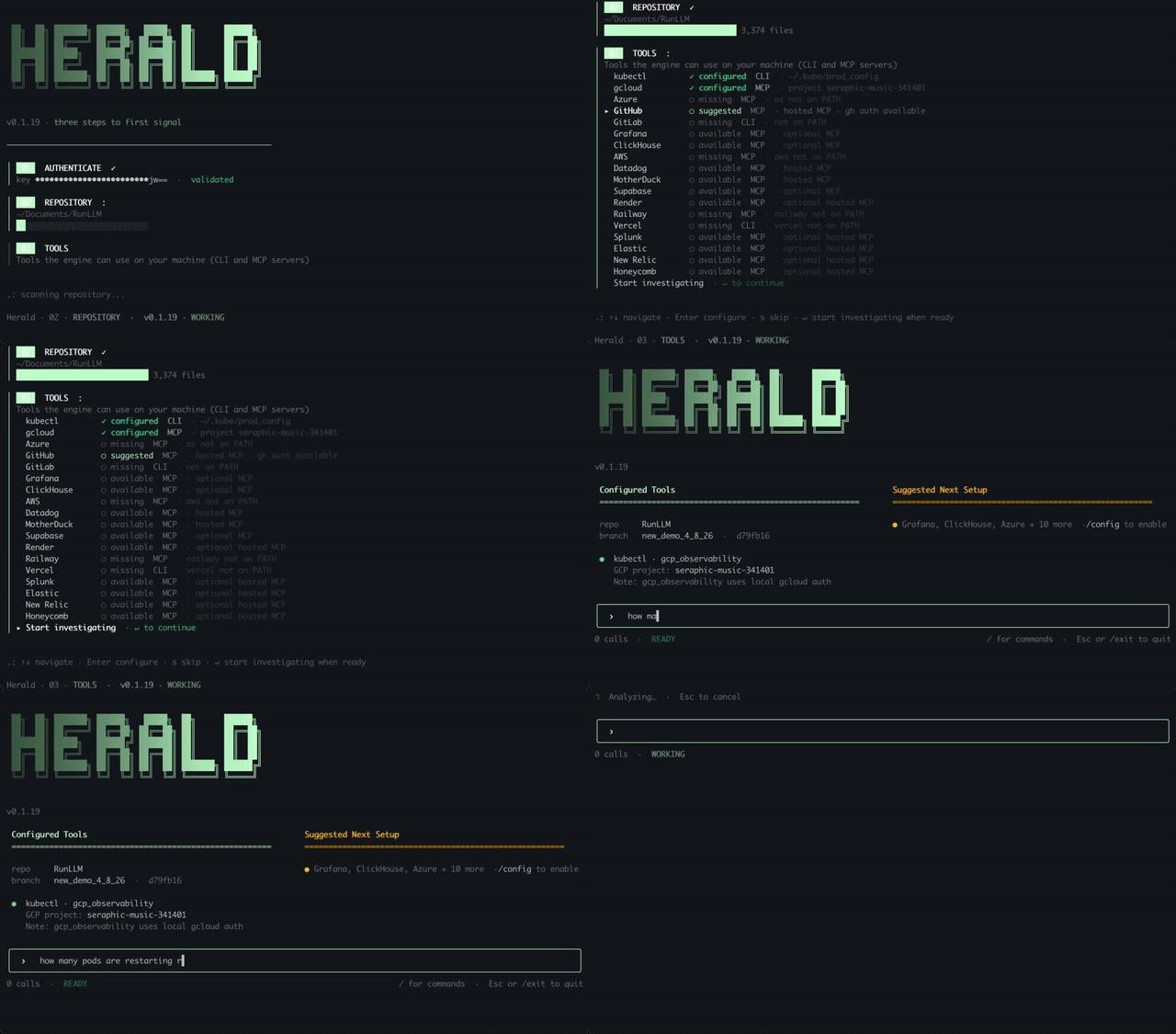
Install the CLI
Section titled “Install the CLI”Install the npm package and start the CLI:
npm install -g @herald-ai/heraldheraldStart a Session
Section titled “Start a Session”From the repository you want Herald to use, run:
heraldThis opens an interactive session where you can ask questions and continue with follow-ups.
> why are pods in the checkout namespace restarting?To exit the session, type /exit.
First-Time Setup
Section titled “First-Time Setup”The first time you run herald after installing the CLI, Herald walks you through a short setup flow. The terminal will show an authentication link, where you can sign in and generate your unique API key. Paste that key back into the CLI when prompted.
During setup, Herald inspects what is available on your machine and does its best to connect to useful local tools. For example, if it sees Kubernetes, Google Cloud, Grafana, Prometheus, or similar infrastructure signals in your repo or environment, it can offer to connect to the matching local tools.
These connections use your existing local credentials and configuration. Herald does not ask you to manually recreate everything you already have set up on your laptop.
Supported Tools
Section titled “Supported Tools”The CLI can connect to the following local tools during setup or from /config.
Supported today
Local
gitrepositories Kubernetes
 kubectl/kubeconfig Google Cloud
 gcloud AWS CLI
 Azure CLI
 Grafana
ClickHouse
 MotherDuck
 Datadog
 Splunk
 New Relic
 Elasticsearch
 Honeycomb
Vercel
Supabase
Render
Railway
Coming soon
 CircleCI
 Buildkite
Security FAQ
Section titled “Security FAQ”Does Herald need my credentials?
The CLI can use local files and tools that are already configured on your machine, such as your kubeconfig, kubectl, and gcloud. You do not need to give Herald API keys, cloud credentials, tokens, or service account keys, and those credentials do not leave your local machine.
Can I bring my own LLM key?
Bring your own LLM key support is coming soon. It will be handled as a model configuration option, separate from local tool connections like kubectl, gcloud, and git.
Does Herald run locally?
The CLI runs on your local machine and uses your local repository, shell environment, and configured developer tools to gather context. Your existing credentials stay managed by those local tools.
If you run into any issues, please reach out to us at support@herald.dev.
